
The Now Book It CRM allows you to pull information from your contacts or their visit history to add specific information into the emails they receive.
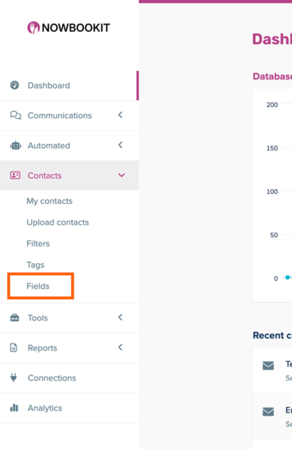
To access the CRM, click the "CRM" box in the upper right corner from your Admin (www.admin.nowbookit.com) page. Once you've logged in, you can see Fields by going to Contacts > Fields.
Fields Explained
| Field Name | System Name | Type | Field Action |
| First name | first_name | Text | First name of contact |
| Last name | last_name | Text | Last name of contact |
| Email address | Text | Email of contact | |
| Mobile number | mobile_number | Mobile Number | Mobile number of contact |
| Gender | gender | Single choice (dropdown/radios) | Gender of contact |
| Date of birth | date_of_birth | Date | Date of birth for contact |
| Creation date | created_at | Date | Date of contact creation |
| Local | local | Single choice (dropdown/radios) | If the contact is a local customer |
| Age | age | Derived Field | Age of customer |
| Signup source | signup_source | Text | Where the customer enrolled |
| Contactable by | contactable_by | Contactable By | How the customer wants to be contacted |
| Next Booking Location | next_booking_location | Text | Where the next booking will occur |
| Days before next booking | days_before_next_booking | Formula | Number of days before next booking |
| Next Booking Service | next_booking_service | Text | The service for the next booking |
| Next Booking Date | next_booking_date | Date | Date of the next booking |
| Next Booking Covers | next_booking_covers | Number | Number of people in the next booking |
| Next Booking Status | next_booking_status | Text | Status (confirmed, cancelled, etc) for the next booking |
| Next Booking Time | next_booking_time | Text | Time of the next booking |
| Last Location Visited | last_location_visited | Single choice (dropdown/radios) | Last booking location |
| Visits Locations | visits_locations | Multiple choice (checkboxes) | Number of venues visited |
| Average booking covers | average_booking_covers | Number | Average number of people across bookings |
| Service periods booked | service_periods_booked | Multiple choice (checkboxes) | Which services have been booked |
| First visit date | first_visit_date | Date | Date of first booking |
| Weekdays visited | weekdays_visited | Multiple choice (checkboxes) | Which weekdays customer has booked |
| Expected next visit date | expected_next_visit_date | Date | Based on previous data, when the system expects a next booking |
| Last visit date | last_visit_date | Date | Date of last booking |
| Total visits | total_visits | Number | Total number of bookings |
| Visit frequency | visit_frequency | Single choice (dropdown/radios) | How frequent the customer books |
| Days since last visit | days_since_last_visit | Formula | Days since the last booking |
| Now Book It ID | now_book_it_id | Key - Indexed | Now Book It venue ID |