1. Log into your Now Book It Admin page: admin.nowbookit.com and select Customers:

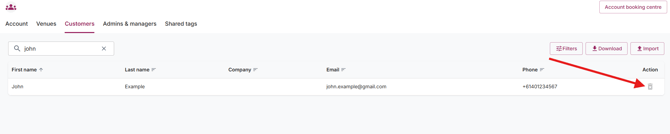
2. Using the Search functionality, type in the customers details to locate their profile, and use the bin icon on the far right hand side to delete them:
3. You now have the option of removing their data, as well as any historical or upcoming bookings as well, using the tick boxes at the bottom of their profile:
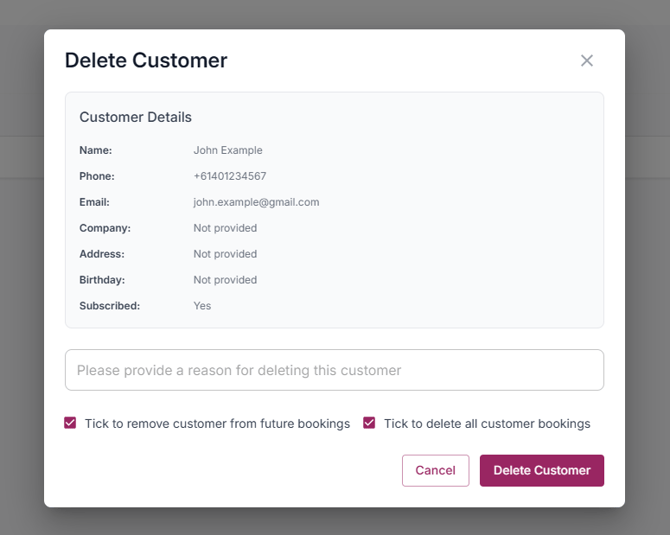
4. Ensure those boxes are ticked to remove their booking data if you wish to, otherwise leave unticked and then select Delete Customer.
PLEASE NOTE: Once a customer is deleted, there is no way to recover their information.
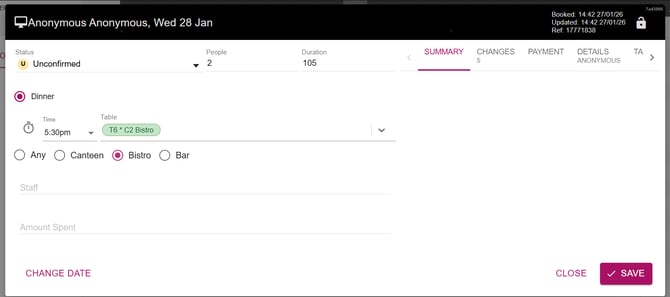
If you have opted to remove booking data for this customer, any bookings they have in your diary will now appear as anonymous, like below: