
How to Access Gift Card Options 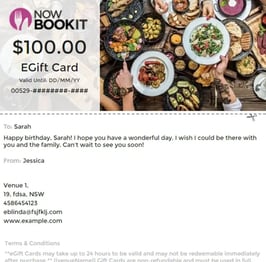
- Take note of the last 4 digits of the restaurant gift card featured on the left hand side of the voucher
- Log in to your Now Book It Admin portal
- Select the “Management” tab under “Gift Cards” on the left hand side to view all your venues gift cards
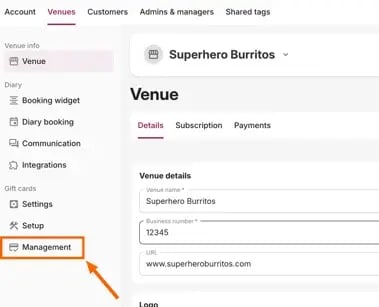
- You can also access the Gift Cards from the diary page by clicking the “Gift Card” button in the top right hand corner of the Diary Page. This will then also bring up the “Gift Card Management” page.
- Enter the last 4 letters and numbers from the Gift Voucher into the Card Number search bar
- Click into the correct Gift Card to open it. This will give show you details of the gift card, as well as offer you four options to interact with the card.

Select the action you would like to complete:
Mark As Used
- A popup will appear with the card details displayed - check the details are correct and then select ‘Use Card’.
Mark As Cancelled
- A popup will appear with the card details displayed - check the details are correct and then select ‘Cancel Card’.
Partial Redeem
- A popup will appear with the card details displayed - check the details are correct, enter the partial redeem amount and then select ‘Redeem Card’.
Note: If you Partially Redeem the Gift Card, the recipient will receive an updated Gift Card with the new total amount. In the above popup, a new email address can be entered for the new card amount to be sent to.
Reissue
This option allows you to reissue the gift card, using the details shown further down the same page.
Tip: If the details are incorrect, you can select the ‘close’ button and go back to the management portal and select the correct card.
More guides on gift cards: